
Create a LinkedIn Profile
With over 500 million members, 9 million companies and 10 million job postings, LinkedIn is an incredibly powerful tool for both students and working professionals. In his video lessons, Oliver Schinkten walks us through the fundamentals of setting up a professional and strong LinkedIn profile. He begins by emphasising the importance of your profile picture and headline as that is the very first thing people see when they search for you and will provide them with a snapshot of who you are and the message you want to reflect. From here, LinkedIn has several more subsections to fill out that provide viewers with a more insight on who you are. These include a summary of who you are and what you are passionate about, your work history, education level, as well as any special skills that you possess. These sections allow viewers to get a better understanding of what you offer and the value that you bring to the market.
Schinkten continues by providing smart tips on the details of setting up a strong profile. We learn that by having 5 or more skills listed, your profile is “27 times more likely to show up in search results” (Schinkten, 2018). He also recommends leveraging your past working relationships through the form of endorsements and profile posted recommendations. These will help add to the strength of your profile and improve the likelihood of overall success.
Build Your Network
“Two of the most popular ways companies find new hires are through employee referrals and social professional networks” (Schinkten, 2018). This highlights the importance for LinkedIn users to have a strong profile and professional network. Schinkten describes the strategies behind growing your personal network and adding connections on the platform. There are three types of connections you should have: advocates who promote you, strategic ins who are well connected in the industry you are in and finally subject matter experts who you can learn from. By having these types of connections, you are able to form a “win win” (Schinkten, 2018) relationship where you each provide each other with a certain level of value. Best practices include sending someone a message with your connection request and the reason for connecting.
LinkedIn has a powerful search tool that allows you to find and filter connections at a very granular level. You can search by people, job, content, groups, schools or use the Boolean modifier function to set specific and/or searches. Another function to find connections of interest is through the Alumni tool that helps find alumni of your school or through LinkedIn groups where people of shared interest congregate.

Photo by Snapwire on Pexels.com
Using LinkedIn Day-to-Day
LinkedIn is very similar to other social network platforms in terms of its day to day functionality. You can make connections, follow different companies and influencers, send and receive messages as well as publish your own content for your network and other users to view and engage in. While using these functions on LinkedIn, you want to be mindful of the digital footprint that you leave behind. Your digital footprint is “essentially your own personal brand” (Schinkten, 2018). This is incredibly important as the majority of employers will search potential candidates on LinkedIn and their digital footprint will influence them in their decision. Those with profiles that reference poor quality traits will be viewed negatively, while those with good will be favourable. I believe that by completing courses through LinkedIn Learning shows prospective employers that you have the desirable attitude towards personal development and growth.
Job Search and Company Research
When searching for a new job, LinkedIn is a very valuable resource. Schinkten walks us through the assortment of features that LinkedIn makes available for job searching including its powerful search engine. Again, similar to how to find connections, you can search for specific job postings and add layers of filters to find the exact type of job you are looking for. You can also search companies directly and find any postings and analytics directly on their page. Once you’ve found a job posting that is of interest, you can apply for that job directly from LinkedIn. Job alerts are also available to send the user notifications when jobs are posted that meet their set of filters.
Manage Your LinkedIn Account
Schinkten concludes his video course by demonstrating some best practices in managing your profile. First, he encourages his audience to consider using the Premium version of LinkedIn. This version has some beneficial features that are not available with the standard free account. These include company insights, the ability to send in-mail and to move up on job applications. Depending on your specific goals, premium may be worth the investment. He next, suggests taking a detailed look at your setting and managing them correctly. You may not wish to have your network updated on profile updates or have them know if you’ve viewed their profile or not. By checking these settings regularly, ensures that you are aligned with your desired digital footprint.
Conclusion
One of the key takeaways I’ve taken from Oliver Schinkten’s course was the need to add more details into my profile. This is important for anyone who I wish to do business with so they can have a better understanding of what the company does and how to get connected with us more easily. This is my profile before:
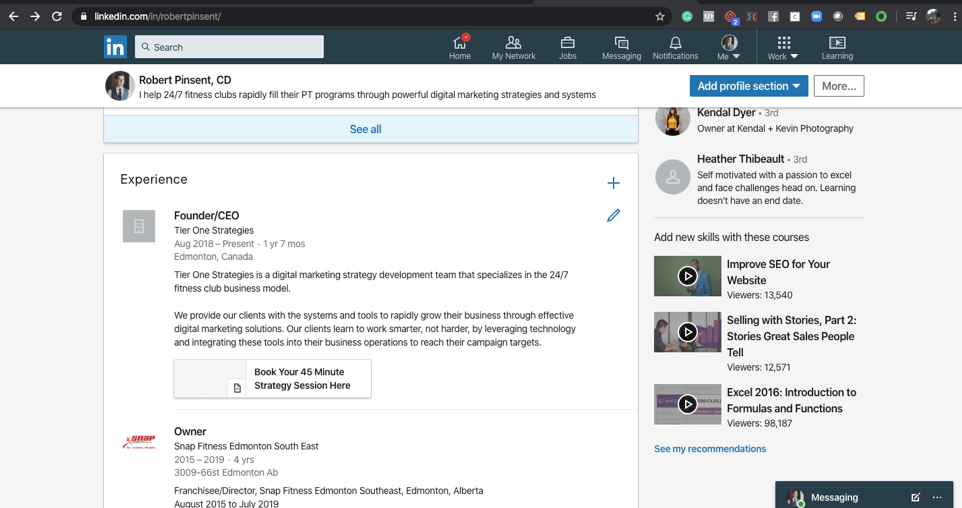
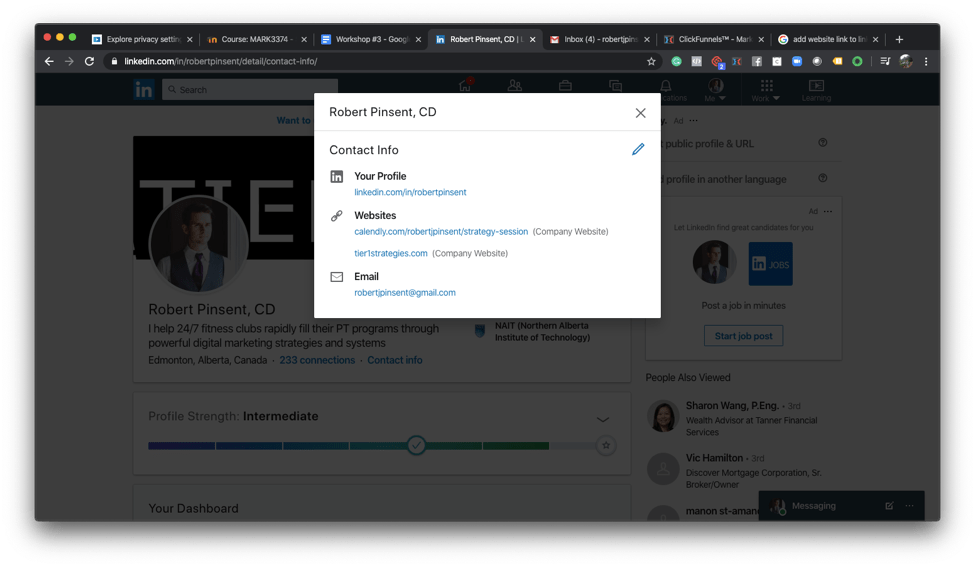
After review, I’ve decided that more information in the experience tab was needed so I’ve added more details about my company and what we do. I’ve also changed the URL from just our booking calendar integration to adding our website URL. This will allow viewers of my profile to view to be able to continue directly to the website if they wish to learn more about our services where they will be able to book a strategy session anyways.
References
Schinkten, O. (2018, October 18) Learning LinkedIn for students. [Video course] Retrieved from https://www.linkedin.com
 Robert's NAIT Blog